
SECUREHUB CONNECTORS: Recruit qualified under-utilised talent instantly.
Our mobile-first app provides the perfect platform for accessing skilled, pre-vetted workers exactly when you need them.

Hire smarter and scale workforce faster

80% Shift Coverage
Reliable staffing you can count on.

Hired in 30 Minutes
Fast placement when you need it most.

Over 95% Star Talent
High-performing, trusted workers.

Rewards & Benefits
Access exclusive rewards and benefits.
Why SHUB Connect?
Hire when you need to, without the long hiring cycles. SHUB Connect helps businesses quickly access reliable, shift-ready workers across hospitality, retail, warehousing, facilities management, and business support. Post shifts, fill gaps fast, and scale your workforce up or down as demand changes.
No overhead, no guesswork. Every worker on SHUB Connect is profiled, verified, and rated based on performance, so you can hire with confidence. From one-off shifts to ongoing support, SHUB Connect gives employers a smarter, flexible way to manage staffing.
Get started today post your first shift in minutes.
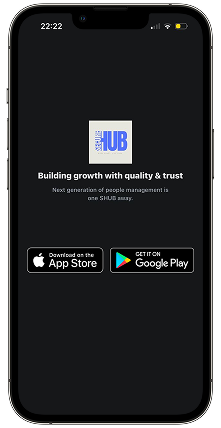
1
Getting Started: Download the SHUB CONNECT App from Apple Store or Google Play, then sign up as a company and request verification.
2
Getting Verified: Our experienced team will diligently verify your profile within 48hrs and an email confirmation will get sent to you. Once Verified, you can access our marketplace platform to create your first shift.
3
SHUB Credits & Wallet: SHUB Credits power shift creation on SHUB Connect. Employers use credits (10 free credits for first time user) from their wallet to post jobs and manage staffing needs quickly and seamlessly
4
Post your first Job: Create a job in just a few steps. Click Create Job or tap the + button in the Discovery tab, choose your job type, and review or edit the job description. Set how many workers you need, customise shift times and dates, add the job location, select required skills and dress code, then post your job. Once live, your shift is visible to available workers and ready to be filled.
Get started today post your first shift in minutes.
1
Getting Started: Download the SHUB CONNECT App from Apple Store or Google Play, then sign up as a company and request verification.
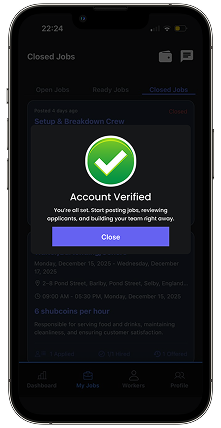
2
Getting Verified: Our experienced team will diligently verify your profile within 48hrs and an email confirmation will get sent to you. Once Verified, you can access our marketplace platform to create your first shift.
3
SHUB Credits & Wallet: SHUB Credits power shift creation on SHUB Connect. Employers use credits (10 free credits for first time user) from their wallet to post jobs and manage staffing needs quickly and seamlessly
4
Post your first Job: Create a job in just a few steps. Click Create Job or tap the + button in the Discovery tab, choose your job type, and review or edit the job description. Set how many workers you need, customise shift times and dates, add the job location, select required skills and dress code, then post your job. Once live, your shift is visible to available workers and ready to be filled.
Get started today post your first shift in minutes.
1
Getting Started: Download the SHUB CONNECT App from Apple Store or Google Play, then sign up as a company and request verification.
2
Getting Verified: Our experienced team will diligently verify your profile within 48hrs and an email confirmation will get sent to you. Once Verified, you can access our marketplace platform to create your first shift.
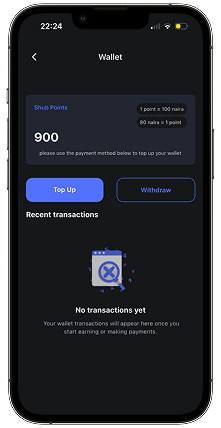
3
SHUB Credits & Wallet: SHUB Credits power shift creation on SHUB Connect. Employers use credits (10 free credits for first time user) from their wallet to post jobs and manage staffing needs quickly and seamlessly
4
Post your first Job: Create a job in just a few steps. Click Create Job or tap the + button in the Discovery tab, choose your job type, and review or edit the job description. Set how many workers you need, customise shift times and dates, add the job location, select required skills and dress code, then post your job. Once live, your shift is visible to available workers and ready to be filled.
Get started today post your first shift in minutes.
1
Getting Started: Download the SHUB CONNECT App from Apple Store or Google Play, then sign up as a company and request verification.
2
Getting Verified: Our experienced team will diligently verify your profile within 48hrs and an email confirmation will get sent to you. Once Verified, you can access our marketplace platform to create your first shift.
3
SHUB Credits & Wallet: SHUB Credits power shift creation on SHUB Connect. Employers use credits (10 free credits for first time user) from their wallet to post jobs and manage staffing needs quickly and seamlessly
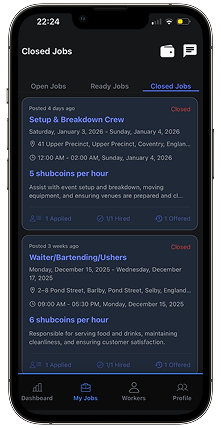
4
Post your first Job: Create a job in just a few steps. Click Create Job or tap the + button in the Discovery tab, choose your job type, and review or edit the job description. Set how many workers you need, customise shift times and dates, add the job location, select required skills and dress code, then post your job. Once live, your shift is visible to available workers and ready to be filled.
Shubconnect made hiring much easier for our company. We filled a position the same day we posted it.
John Doe
HR Manager
The platform is straightforward and saves us time during recruitment.
Jane Smith
Recruitment Specialist
We needed temporary staff urgently, and Shubconnect delivered.
Robert Johnson
Operations Manager
The workers were punctual, respectful, and ready to work.
Emily Davis
Team Lead
We've consistently hired hardworking professionals through Shubconnect.
Michael Wilson
Business Owner
The screening process clearly works. Staff are reliable and dependable.
Sarah Brown
Operations Manager
Hire Fast. Build Your Team Today.
Connect with verified workers and fill open roles fast with flexible staffing.